How to make an online quiz for your class (free)
One quiz, three ways to use it: a team contest on the projector, a live quiz on students' phones and a practice link for homework. No student needs an account or an email address.
Short answer
Open Quiz Maker & Player, type your questions (or import a CSV file from Excel) and choose how to play: “Class quiz” for teams on the projector, “Share & print” for a WhatsApp practice link, or import the quiz into Live Class Quiz, where students join at apnipathshala.ai/join with a 6-digit code and a nickname.
Make and run a quiz in 6 steps
-
Start a new quiz
Open Quiz Maker & Player and press “New quiz”. Give it a title, for example “Class 8 Science: Light”. A sample quiz is already there if you want to try it first.
-
Add the questions
Choose “Multiple choice” or “True / False”, type the question and the options, tick the right answer and add a one-line explanation. Press “Add question”. Questions already in Excel? Save them as CSV with the columns question, option1 … option6, correct and explanation, and import the file.
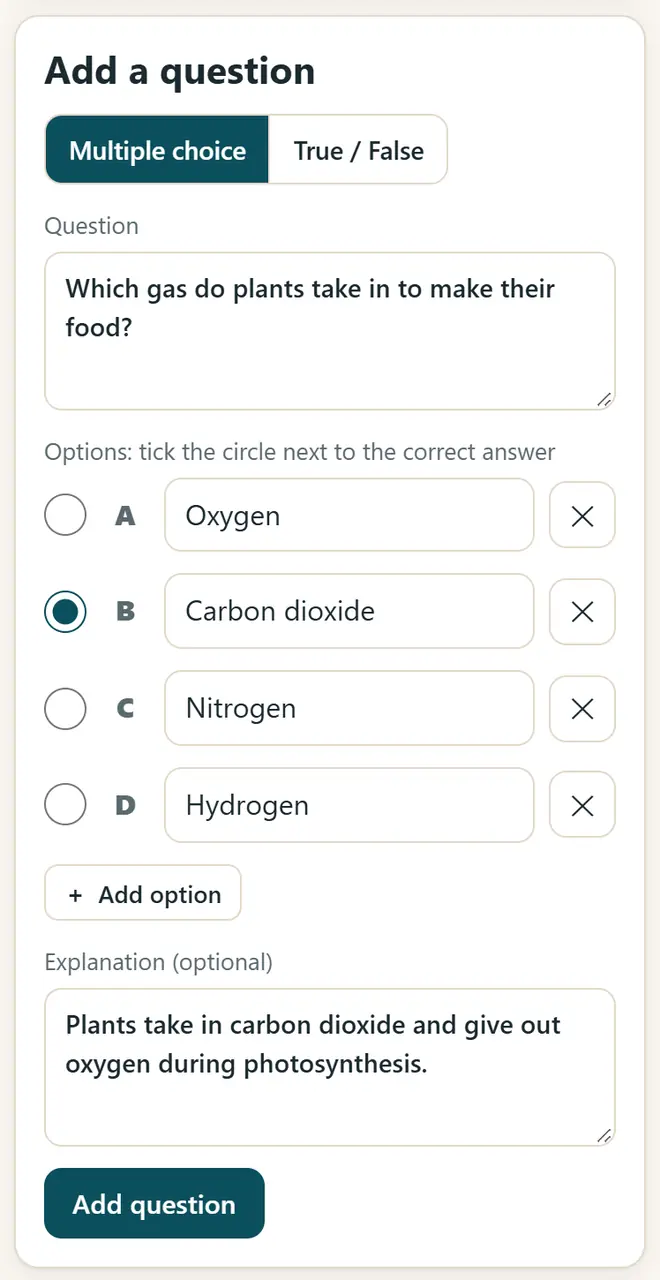
Quiz Maker: type a question, tick the right answer and add an explanation. -
Play it in class with teams
Open the “Class quiz” tab on the projector. Divide the class into teams A–D, show one question at a time, let the teams discuss until the timer ends, then show the answer and give a point to every team that was right.
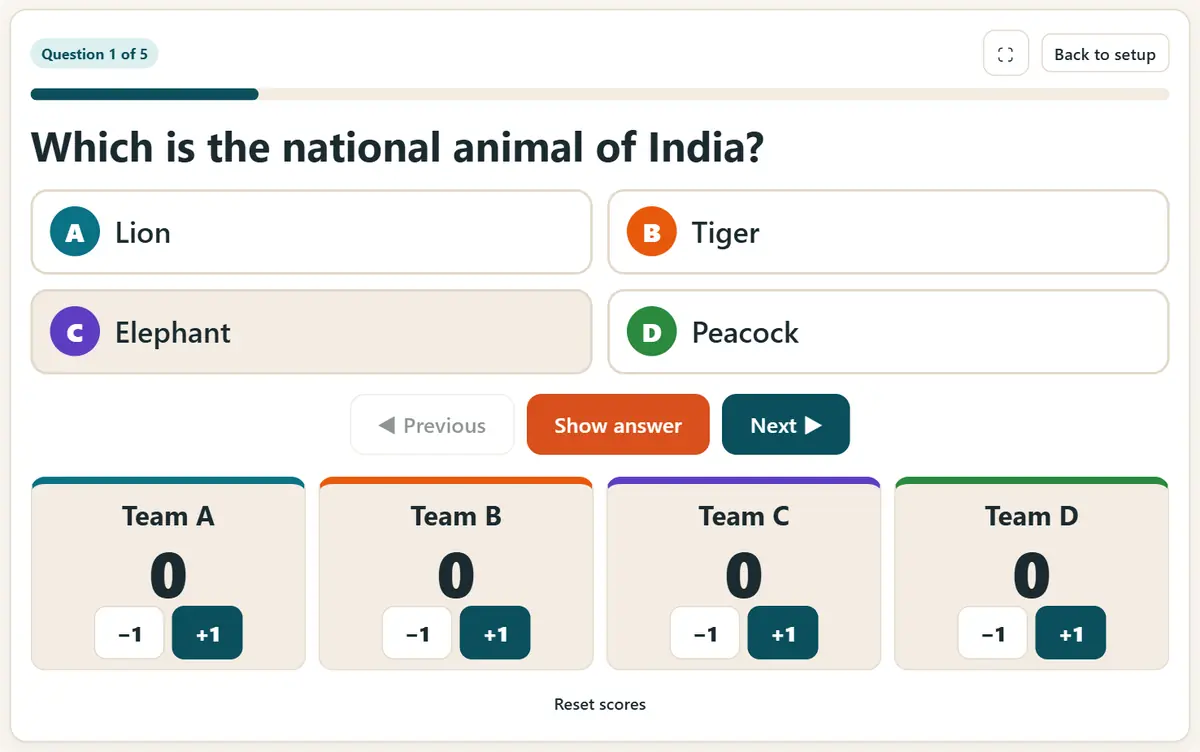
Class quiz on the projector with team scores. -
Send a practice link on WhatsApp
In “Share & print”, copy the quiz link and send it to the class group. The whole quiz is packed inside the link, so it works without any login. You can also print the questions, with the answer key on a separate page.
-
Run a live quiz on students' phones
For a Kahoot-style live quiz, open Live Class Quiz and sign in with Google (only the teacher signs in). Import your quiz and press “Host live”. Students open apnipathshala.ai/join, type the 6-digit code and a nickname, and answer on their phones.
-
See the results
A correct answer gets 500 to 1000 points: the faster, the more. The leaderboard appears after each question, and you can download the results as a CSV file. Results are deleted after 30 days.
Tips for a good class quiz
- Keep 10 to 15 questions for one period, and one idea per question.
- Write a short explanation for every answer: students learn the most right after a mistake.
- In the live quiz, ask students to use a nickname, not their full name.
- No phones in class? Play the class quiz on the projector, or print the worksheet.
Get new free tools and Hindi AI lessons
Join our email list to hear about new free apps, new guides and Hindi video lessons on AI. No spam.
For adults (18+). You can unsubscribe at any time.
Why we recommend these tools
- Free for everyone: no ads, no sign-up and no paid plan.
- Private: your files and details stay on your own device.
- Works on a phone, laptop or smartboard, and offline once opened.
- Available in 12 languages, including Hindi.
Prefer video? Watch free Hindi lessons on AI and free tools on our YouTube channel.
Frequently asked questions
Do students need to sign up?
No. Practice links and class quizzes need no account at all. In the live quiz, students type only a code and a nickname, and their answers are deleted after 30 days.
Is this a free alternative to Kahoot or Quizizz?
For most classroom needs, yes: MCQ and true/false questions, a live leaderboard, team play and results as CSV, free and without ads. It is simpler than the paid tools and works in 12 languages.
Can I make a quiz in Hindi?
Yes. Type the questions in Hindi or any Indian language. The buttons and menus of the app are also available in 12 languages.
Does the practice link work without internet?
Students need internet to open the app the first time. After that it works offline, because the quiz is read from the link on the phone itself.
Can I print the quiz as a worksheet?
Yes. In “Share & print”, print the question sheet. The answer key prints on a separate page, so you can keep it with you.
Found this useful?
Send it to a friend, your colleagues or your school's WhatsApp group.