How to reduce PDF size to 100 KB or 200 KB for online forms
Exam, job and scholarship portals often reject a PDF that is even a few KB too big. Here is how to shrink it to the exact size the form asks for, on a phone or a computer, without uploading it anywhere.
Short answer
Open PDF Compress & JPG to PDF, choose your PDF, tap the size the form asks for (100 KB, 200 KB, 500 KB…), keep “Strong: reach the size” and press “Compress PDF”. Check the pages with “Compare before / after”, then download. To turn photos into a PDF first, use the “JPG to PDF” tab.
Compress a PDF in 5 steps
-
Open the app and choose your PDF
Open PDF Compress & JPG to PDF. In the “Compress PDF” tab, press “Choose PDF” and pick your file.
-
Pick the size the form asks for
Tap 100 KB, 200 KB, 500 KB, 1 MB or 2 MB, or type your own size under “Other”. The app shows how much smaller the file has to become.
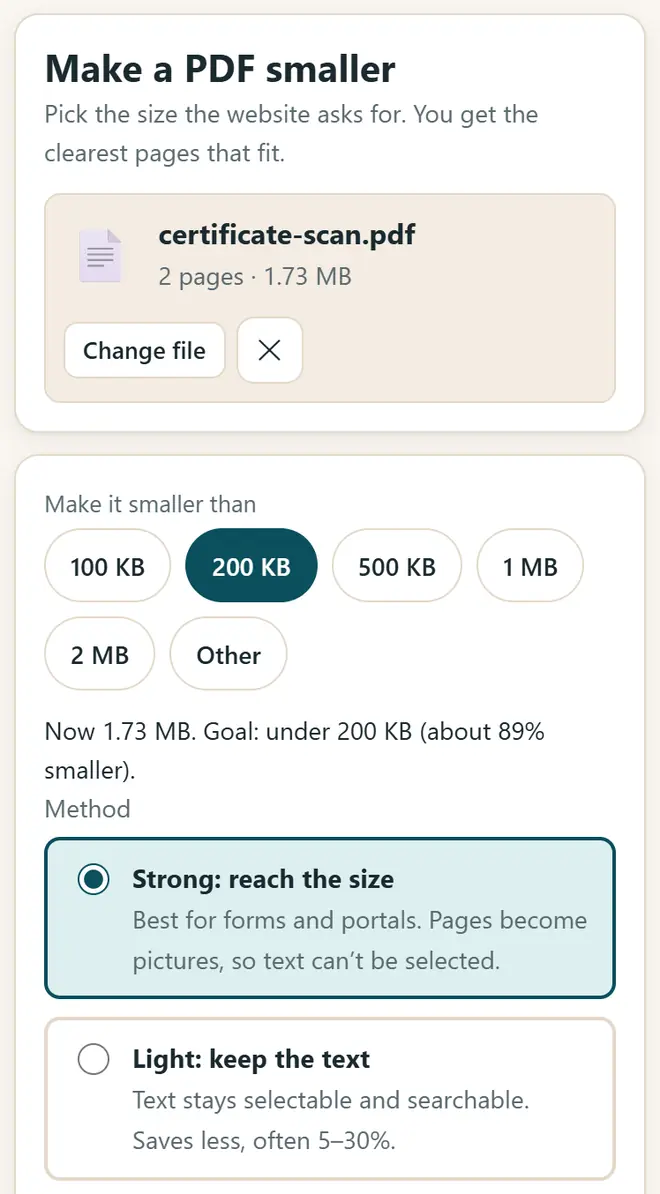
Pick the size the form asks for: 100 KB, 200 KB, 500 KB and more. -
Choose the method
“Strong: reach the size” reaches the size and is best for forms. “Light: keep the text” keeps the text selectable but saves less. For scanned pages, tick black & white (grayscale) to make the file even smaller.
-
Compress and check
Press “Compress PDF”. The app tries different settings and keeps the clearest pages that fit. Use “Compare before / after” to make sure the text is still easy to read.
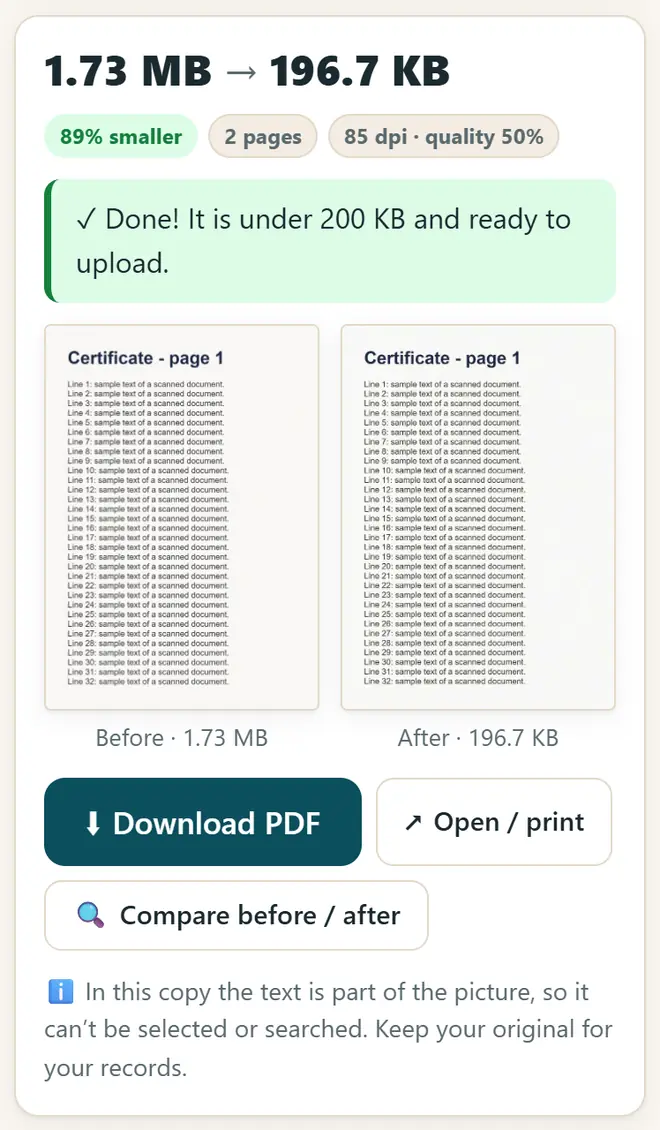
Done: the new file is under the limit, with a before / after check. -
Download and upload it to the form
Press “Download PDF”. Keep your original file too: the small copy is only for uploading.
Photos and signatures for forms
- Turn photos of documents into one PDF in the “JPG to PDF” tab. It can even put the front and back of an ID card on one page.
- Need a photo or signature in exact pixels and KB, for example 20–50 KB? Use Form Photo & Signature Resizer.
- Need many photos smaller for WhatsApp or a website? Use Image Compressor & Resizer.
- Always read the size rules in the official notice of your exam or job: the limits change from form to form.
Get new free tools and Hindi AI lessons
Join our email list to hear about new free apps, new guides and Hindi video lessons on AI. No spam.
For adults (18+). You can unsubscribe at any time.
Why we recommend these tools
- Free for everyone: no ads, no sign-up and no paid plan.
- Private: your files and details stay on your own device.
- Works on a phone, laptop or smartboard, and offline once opened.
- Available in 12 languages, including Hindi.
Prefer video? Watch free Hindi lessons on AI and free tools on our YouTube channel.
Frequently asked questions
How do I reduce a PDF to 100 KB?
Choose the PDF, tap 100 KB, keep “Strong: reach the size” and press “Compress PDF”. If the pages have very small text, try 200 KB or grayscale, or split the PDF into parts.
Will the quality drop?
Strong compression turns pages into pictures, so the text can't be selected, but the app picks the sharpest quality that still fits. Check with “Compare before / after” before you upload.
Is my document uploaded anywhere?
No. The PDF is processed inside your browser and never leaves your device. That makes it safe for marksheets, Aadhaar and certificates.
How do I make a PDF from JPG photos?
Open the “JPG to PDF” tab, choose the photos, set the order and the page size, and press “Make PDF”. You can also set a size limit, such as under 200 KB.
Does it work on a mobile phone?
Yes, in Chrome on Android and in Safari on iPhone. It needs internet the first time to load the PDF tools, and then works offline.
Found this useful?
Send it to a friend, your colleagues or your school's WhatsApp group.