How to convert Kruti Dev to Unicode (and back)
Old Kruti Dev files look like “fd;k” on phones and websites, because the font only draws Hindi shapes over English letters. Converting to Unicode makes it real Hindi text that works in WhatsApp, Google Docs, email and search.
Short answer
Open Kruti Dev - Unicode Converter, keep “Kruti Dev → Unicode” and paste your Kruti Dev text. The Unicode Hindi appears at once: press “Copy result” or “Download .txt”. If an office or a press needs Kruti Dev, choose “Unicode → Kruti Dev” instead.
Convert Kruti Dev to Unicode in 5 steps
-
Copy the Kruti Dev text
Open your old Word or PageMaker file, select the text (Ctrl+A) and copy it (Ctrl+C). For a long .txt file, you can open the file in the converter instead.
-
Open the converter
Open Kruti Dev - Unicode Converter and make sure “Kruti Dev → Unicode” is selected. Press “Sample” to see an example first.
-
Paste the text
Paste into the text box. The Unicode result appears at once. Red marks show characters that could not be converted and need a check by hand.
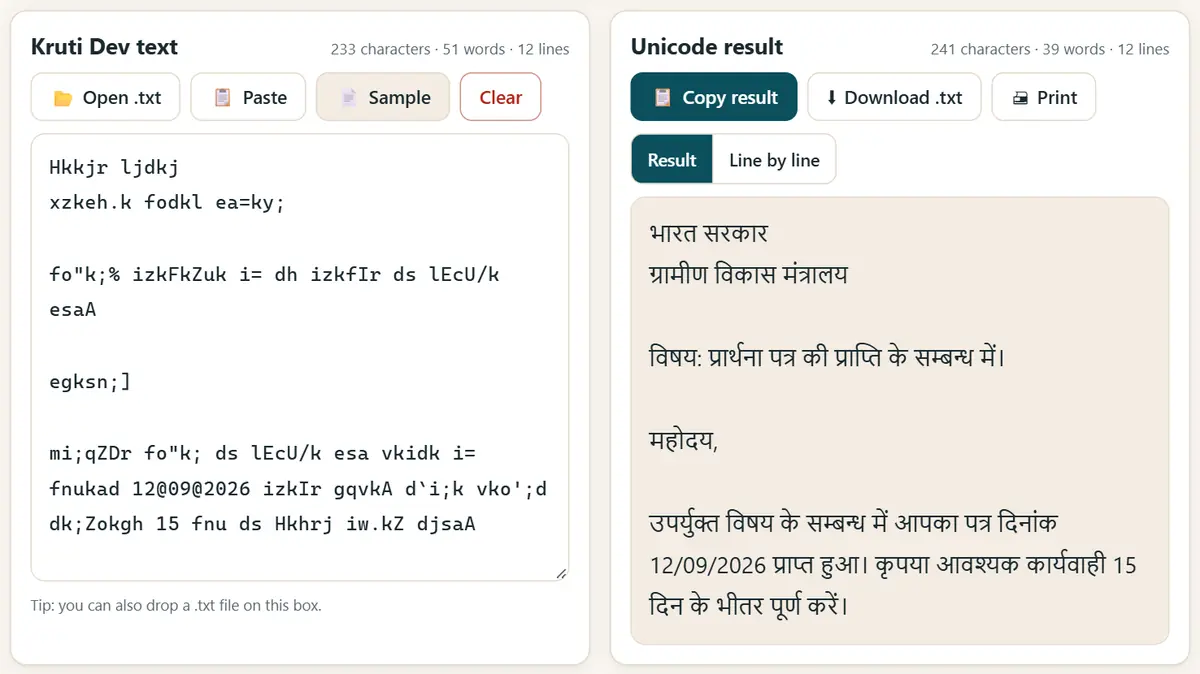
Kruti Dev text in, Unicode Hindi out, as you type. -
Keep English words as they are
If your letter mixes Hindi with names, emails or file numbers in English, turn on “Keep English words, numbers, emails and links as they are” so those parts stay unchanged.
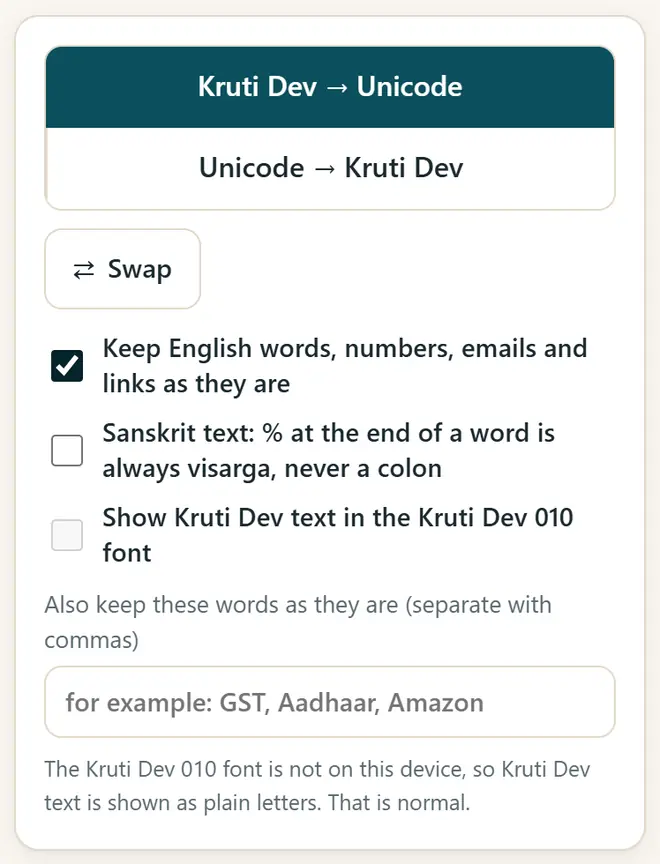
Options: keep English words, numbers and links unchanged. -
Copy or download the result
Press “Copy result” and paste it anywhere, or press “Download .txt”. In Word, use a Unicode font such as Mangal, Nirmala UI or Noto Sans Devanagari.
Kruti Dev and Unicode: what is the difference?
- Kruti Dev 010 is an old font: the computer stores English letters (fd;k) and the font draws them as Hindi (किया).
- Unicode (Mangal, Nirmala UI, Noto) stores the real Hindi letters, so every phone, website and search engine can read them.
- Many offices, courts and typing tests still use Kruti Dev, so the converter also works the other way: “Unicode → Kruti Dev”.
- Kruti Dev 011, 016, 055 and DevLys 010 use the same keys as Kruti Dev 010, so they convert the same way.
Get new free tools and Hindi AI lessons
Join our email list to hear about new free apps, new guides and Hindi video lessons on AI. No spam.
For adults (18+). You can unsubscribe at any time.
Why we recommend these tools
- Free for everyone: no ads, no sign-up and no paid plan.
- Private: your files and details stay on your own device.
- Works on a phone, laptop or smartboard, and offline once opened.
- Available in 12 languages, including Hindi.
Prefer video? Watch free Hindi lessons on AI and free tools on our YouTube channel.
Frequently asked questions
How do I convert Kruti Dev to the Mangal font?
Mangal is a Unicode font. Convert the text from Kruti Dev to Unicode, paste it into Word and set the font to Mangal or Nirmala UI.
Does it work for Marathi and Sanskrit?
Yes. It handles Marathi letters such as ळ, and has a Sanskrit option where % at the end of a word always becomes the visarga (ः).
Is my text safe?
Yes. The conversion happens on your device. Nothing is uploaded, so it is safe for legal, court and government drafts.
Why do some characters stay red?
They are not part of the Kruti Dev 010 keyboard, often because they came from another font such as Chanakya or from a damaged file. Fix them by hand.
Can I convert Unicode back to Kruti Dev?
Yes. Choose “Unicode → Kruti Dev”, paste the Hindi text, copy the result and set the font to Kruti Dev 010 in Word, PageMaker or CorelDRAW.
Found this useful?
Send it to a friend, your colleagues or your school's WhatsApp group.