GST invoice format: how to make a GST bill for free
A GST tax invoice needs certain details, and the tax split depends on where the buyer is. Here is what to include, and how to make a correct invoice in a few minutes without accounting software.
Short answer
A GST tax invoice shows your name, address and GSTIN, a unique invoice number and the date, the buyer's details (with GSTIN for B2B), the place of supply, every item with its HSN or SAC code, quantity, rate and taxable value, the GST as CGST + SGST (same state) or IGST (another state), the total and a signature. GST Invoice & Quotation Maker works out the tax split for you.
Make a GST invoice in 6 steps
-
Add your business details once
Open GST Invoice & Quotation Maker and fill in “My business”: business name, address, GSTIN, bank account, UPI ID, logo and signature. Every invoice uses them.
-
Choose the document type
Pick “Tax Invoice”, “Quotation”, “Bill of Supply”, a delivery challan or a payment receipt. Invoice numbers run in order for each financial year.
-
Add the customer
Type the customer's GSTIN or choose their state. The app picks CGST + SGST for the same state and IGST for another state on its own.
-
Add the items
Type each item with its HSN or SAC code, quantity, unit, rate and GST rate (0, 0.25, 3, 5, 18 or 40%). Saved items fill in by themselves the next time.
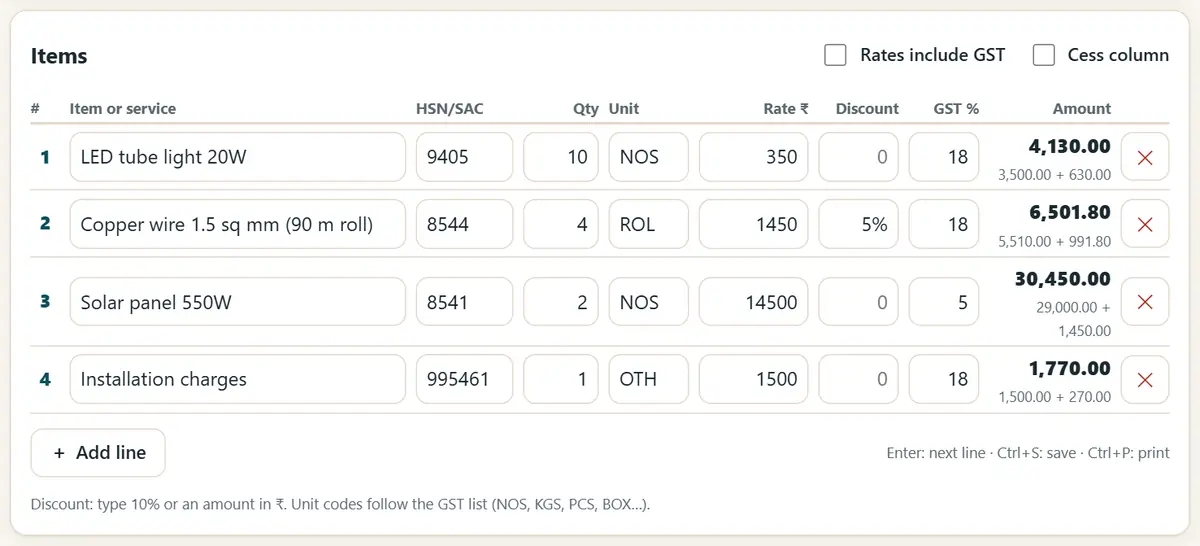
Add items with HSN code, quantity, rate and GST. -
Check the totals
The invoice shows the taxable value, the tax at each rate, the HSN summary and the total in words. Turn on the UPI QR so the customer can pay the exact amount.
-
Print it or save it as a PDF
Press “Print / PDF” and choose Save as PDF to email it or send it on WhatsApp. At the end of the month, download the invoice register for your accountant.
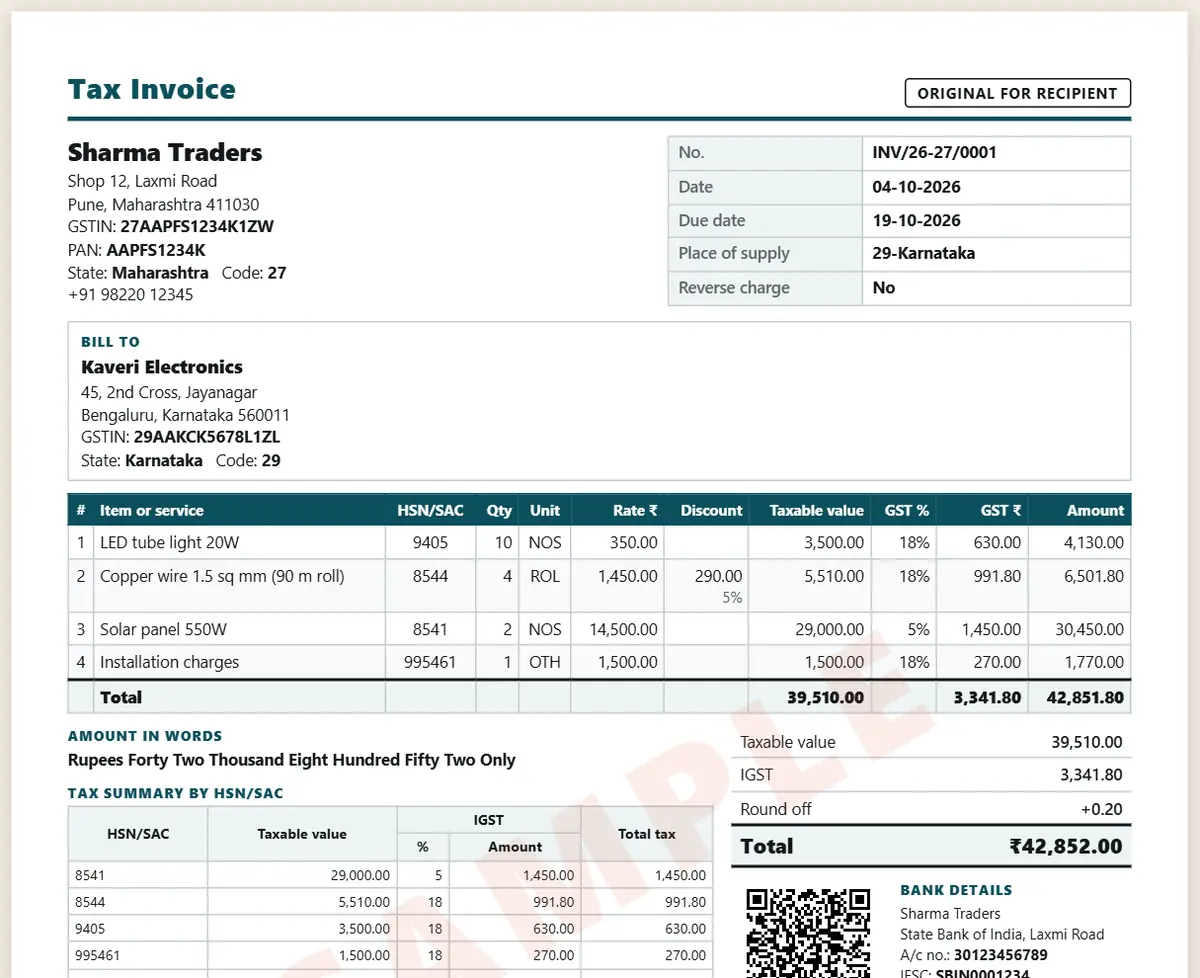
The finished tax invoice with the tax split and totals.
Must-have details on a GST tax invoice
- Your name, address and GSTIN, and a unique invoice number (up to 16 characters) with the date.
- The buyer's name and address, their GSTIN for B2B sales, and the place of supply with the state name.
- For each item: HSN or SAC code, description, quantity, rate, taxable value, GST rate and the CGST, SGST or IGST amount.
- Whether tax is payable on reverse charge, and the signature of the supplier or an authorised person.
- HSN digits: 4 digits on B2B invoices if your turnover is up to ₹5 crore, and 6 digits if it is above ₹5 crore.
This guide is general information, not tax or legal advice. Check your own case with a tax professional.
Get new free tools and Hindi AI lessons
Join our email list to hear about new free apps, new guides and Hindi video lessons on AI. No spam.
For adults (18+). You can unsubscribe at any time.
Why we recommend these tools
- Free for everyone: no ads, no sign-up and no paid plan.
- Private: your files and details stay on your own device.
- Works on a phone, laptop or smartboard, and offline once opened.
- Available in 12 languages, including Hindi.
Prefer video? Watch free Hindi lessons on AI and free tools on our YouTube channel.
Frequently asked questions
What is the difference between CGST, SGST and IGST?
If the seller and the buyer are in the same state, the GST is split half and half into CGST and SGST. If they are in different states, the whole GST is IGST. The app decides this from the place of supply.
When do I issue a bill of supply instead of a tax invoice?
Composition dealers, and sellers of goods or services that are exempt from GST, issue a bill of supply, which shows no GST. Ask your accountant if you are not sure.
Does this make an e-invoice (IRN) or an e-way bill?
No. It is a format helper. E-invoicing with an IRN is needed above ₹5 crore turnover, and e-way bills are made on the government portal.
Are my customer and price details safe?
Yes. Your business details, customers and invoices are saved only in the browser on your device. Make a backup file to keep a copy.
Which GST rates can I use?
Since 22 September 2025 the GST rates are 0, 0.25, 3, 5, 18 and 40%; the 12% and 28% slabs ended then. Check the right rate and HSN code for your goods with your accountant.
Found this useful?
Send it to a friend, your colleagues or your school's WhatsApp group.